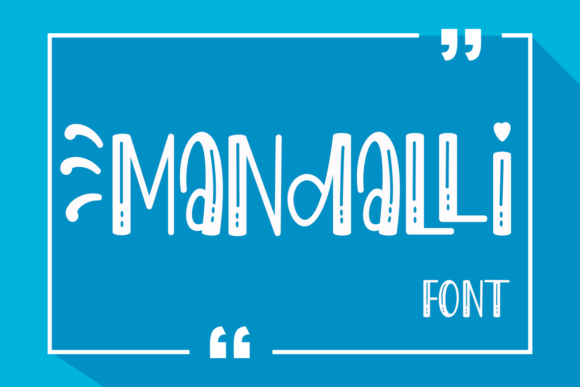
Mandalli: A Fun Display Font for Web Design
While working on a boutique online store project, I found myself searching for a font that could add personality without overwhelming the design. Mandalli, a fun and friendly display font, caught my eye. It’s quirky but versatile, making it a great choice for digital layouts where creativity meets clarity.
As a web designer, I often test fonts in real-world scenarios. Mandalli stood out when I placed it over an image banner for the homepage. Its playful curves and unique shapes added a sense of approachability, which was perfect for a brand focused on handmade goods and personalized experiences.
Visual Characteristics and Personality
Mandalli has a distinct visual identity. It’s not overly ornate, but it carries a subtle charm that feels both modern and nostalgic. The letterforms are slightly irregular, giving it a handcrafted feel without sacrificing legibility. This makes it ideal for headers, logos, and other prominent text elements where style matters.
Its personality is light and friendly, which can help build a connection with users. In a coaching website I designed, using Mandalli for the headline made the content feel more inviting. It wasn’t too bold or rigid, allowing the message to shine through while maintaining a cohesive aesthetic.
Use Cases for Mandalli in Web Design
Mandalli works well in a variety of contexts. For a product landing page, I used it for the main title, pairing it with a clean sans serif for body copy. The contrast helped guide the user’s eye, creating a clear visual hierarchy. It also looked great on CTA buttons, where its friendly tone aligned with the brand’s voice.
In a creative portfolio site, Mandalli served as the logo text. It added a personal touch that felt authentic to the designer’s brand. When used in blog graphics or social media posts, it brought a sense of energy and uniqueness that matched the content’s tone.
For a course sales page, I experimented with Mandalli in the headline section. It provided a strong visual anchor, helping to draw attention without being distracting. The font’s balance between creativity and readability made it suitable for short phrases and headlines, where impact is key.
Readability and Layout Performance
One of the first things I checked was how Mandalli performed on mobile screens. At smaller sizes, it maintained clarity, especially when used for headings. However, I avoided using it for long paragraphs, as its decorative nature could reduce readability in dense text blocks.
On dark backgrounds, Mandalli retained enough contrast to remain legible. On light backgrounds, it didn’t bleed into the space, which was important for a clean, uncluttered design. When placed over images, I adjusted the text color and opacity to ensure it remained visible without overpowering the background.
For responsive layouts, I tested Mandalli at different breakpoints. It scaled well, but I made sure to use appropriate font sizes and line heights to maintain comfort for users across devices.
Font Pairing and Brand Consistency
When working on a digital brand kit, I paired Mandalli with a simple sans serif for body text. This combination created a balanced look—Mandalli handled the creative elements, while the sans serif provided structure and readability. It worked particularly well for email newsletters and marketing materials.
I also explored pairing it with a serif font for a more editorial feel. This was useful for a blog redesign, where the goal was to create a more professional and trustworthy appearance. The contrast between the two fonts added depth without feeling chaotic.
For a small business website, I used Mandalli sparingly. It appeared in the hero section and on buttons, but not in any body text. This ensured the font remained a highlight rather than a distraction, supporting the brand’s overall identity without overwhelming the user.
Practical Considerations for Web Use
Before implementing Mandalli on a live site, I checked its webfont availability. It came in multiple weights and styles, which was helpful for creating a flexible typographic system. I also verified multilingual support, as the client’s audience included non-English speakers.
Commercial licensing was another consideration. I made sure the font was properly licensed for web use, especially since the project involved a client’s online store. This avoided any legal issues down the line.
Overall, Mandalli proved to be a valuable addition to the design toolkit. It brought a sense of character and warmth to the projects I worked on, while still maintaining a level of professionalism that suited the brand’s goals.
Whether you’re designing a creative portfolio, a coaching website, or a product landing page, Mandalli offers a fresh and engaging option for display typography. Its balance of personality and usability makes it a smart choice for designers looking to elevate their digital layouts with a touch of fun and flair.